Tools I Trust and Use Daily
Simple, effective tools that help me (and my clients) stay on top of everything.
My Essential Tools for Efficient Workflows
Some days, running a business can feel like juggling flaming torches — exciting, but a little chaotic without the right tools in place.
That’s why I rely on a few trusted systems to keep everything running smoothly. These are tools I genuinely use every day and confidently recommend to clients who want to stay organised, manage their workload effectively, and maintain a healthy work–life balance.
A few of the links below are affiliate links, which means I may earn a small commission if you choose to sign up for a premium plan — at no extra cost to you. It’s a simple way to support your friendly neighbourhood VA while discovering tools that could transform the way you work.


Time tracking without the hassle
Tracking your hours shouldn’t feel like another job, which is why I use Toggl Track to help me track my time.
Are you a new VA who wants to track your billable hours?
Need a clear idea of how long you spend on different tasks?
Part of a large organisation? No problem, Toggl plans cover that too.
Toggl makes it easy! With one-click timers, apps for desktop, mobile and browser, 100+ integrations and offline-tracking built in, you’ll capture every minute regardless of where you work. When it’s time to review your work, Toggl Track offers detailed reports showing hours, profitability and productivity, so you’ll always bill accurately and know where your time is going.
They offer a generous free plan and a 30-day Premium trial if you want to try it out.
The free plan covers individuals and small teams, while the Premium version includes advanced features like profitability analysis, scheduled reports and single-sign-on support, ideal if your business is growing.
You can watch the video on the left to see how it works, then click the button below to try it out!

Communicate Smarter and Faster with TextExpander
TextExpander is one of those tools you try once and immediately wonder how you ever worked without it. It allows you to communicate quickly, consistently and accurately across all your devices by using custom “snippets” — short abbreviations that instantly expand into full phrases, paragraphs, links, signatures, templates and more.
Whether you’re a VA, administrator, project coordinator, sales professional or developer, TextExpander removes the friction of repetitive typing and keeps your communication clear and efficient. I was introduced to it by a client, and it has genuinely transformed the way I work, saving hours each month and ensuring messages stay consistent across teams and platforms.
Key benefits include:
Snippets that work anywhere: Expand text instantly in any app or browser.
Team-ready efficiency: Create shared snippet libraries for standard replies, instructions, onboarding messages and internal processes.
Ready-made content libraries: Autocorrect dictionaries in English, French and German, plus pre-built groups for symbols, emojis, HTML, CSS, accented characters and more.
Cross-device syncing: Access your snippets seamlessly across desktop, mobile and browser.
From intro emails and client responses to AI prompts, signatures and formatted text, TextExpander streamlines your communication and eliminates repetitive typing, freeing up time to focus on meaningful work.
If your job involves a computer and constant communication, this tool will quickly become indispensable.

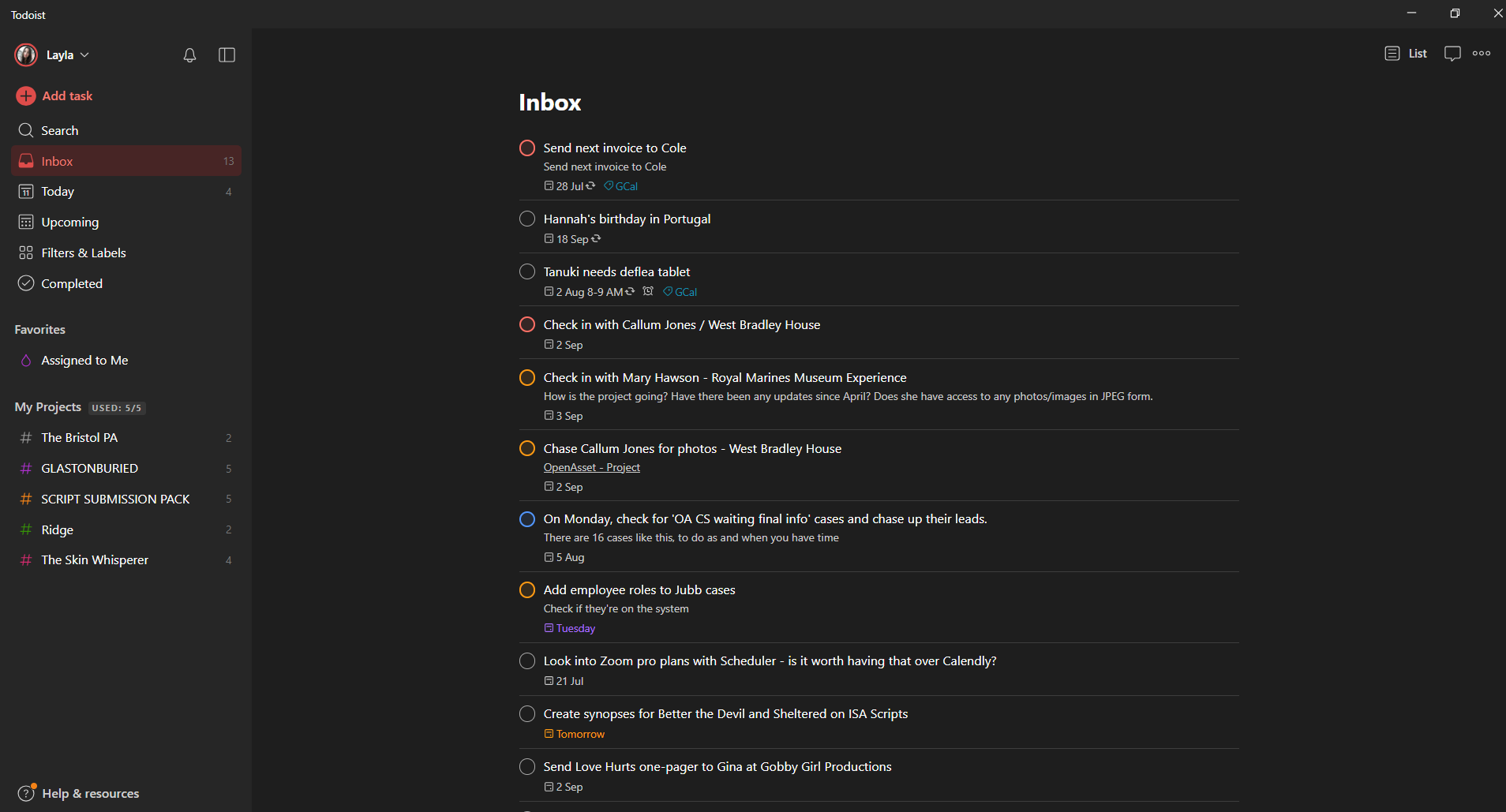
Here’s a screenshot of my Todoist inbox.
My favourite features include dark mode and My Projects
Stay on Top of Every Task with One Powerful Tool
I simply couldn’t run my business without Todoist - I always say that if a task isn’t on my list, it’s not happening.
Todoist brings clarity and control to your workflow, whether you’re managing multiple clients or working solo. With its intuitive interface, cross-platform support (desktop, mobile, browser) and real-time syncing, you’ll always know what needs doing and when.
What sets it apart:
Integration with 126+ apps and services, including Outlook, Gmail, Chrome, Safari and even Toggl Track (see above!) so your entire workflow can be connected.
Native support for the Pomodoro technique, helping you break tasks into focused intervals and maintain momentum.
Regular updates and feature improvements, keeping the tool fresh, flexible and aligned with how modern teams work.
Whether you’re juggling client deadlines, project deliverables or day-to-day admin, Todoist gives you one dashboard to manage it all. It’s effortless to categorise tasks, set deadlines, create recurring items or delegate.
Ready to transform your task-management system? Watch the video on the left and if you like what you see, click the button below to try Todoist and make sure nothing slips through the cracks.